Blog posts section
The Blog posts section of Local shows the latest articles of a blog, with the title, info and excerpt blocks you choose.
Applies to: Local 4.2.1 and later. Added in: Local 1.0.0. Last checked: 2026-10-13 against Local 4.2.1.
The Blog posts section shows the 3 latest articles of a blog as cards, for the home page or any page. You choose the blog and the card layout; the blocks set what each card shows.
Where to find it: in the theme editor, select Add section on any template and choose Blog posts.
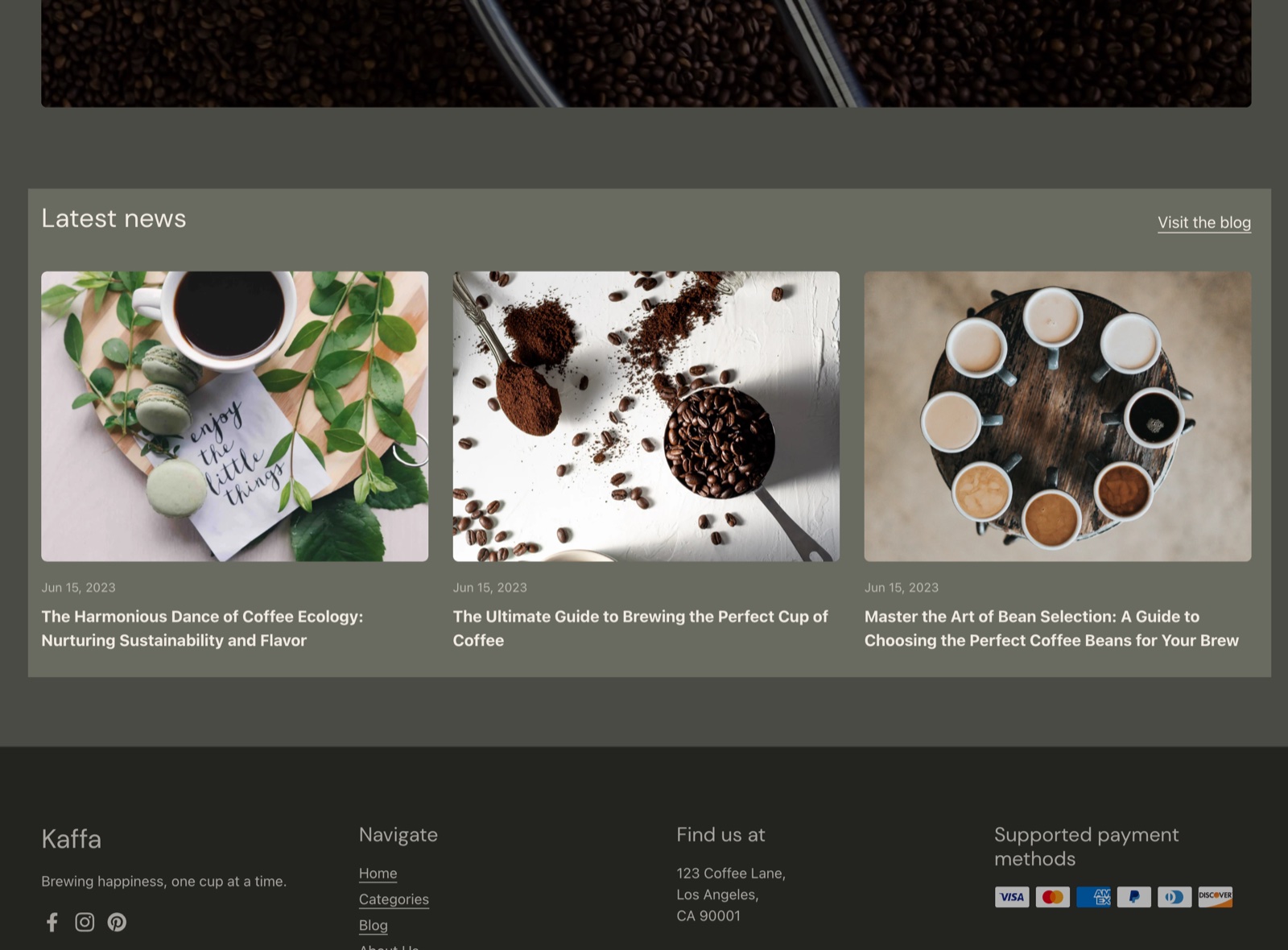
Heading
The section has the standard heading settings: Heading (default "Latest Articles"), Subheading and Text alignment, see General section styling. Show link to blog page (on by default) adds a link to the whole blog next to the heading.
Content
- Blog chooses the blog. Without a blog, the section shows 3 sample cards.
- Emphasize first article (on by default) shows the first article as a bigger card on desktop. It needs Show featured image on.
- Show featured image shows each article's featured image on its card.
- Media aspect ratio crops the images to Short (4:3, the default), Square (1:1), Tall (5:6) or Taller (2:3).
The section always shows the 3 most recent articles. There is no setting for more; use the blog page for the full list.
Section design, SEO and Visibility are the standard settings of General section styling.
Blocks
Each card shows the blocks in the order you set. Each block can be used once.
Title
The Title block shows the article title, linked to the article. It has no settings.
Info
The Info block shows a line of article details:
- Show date (on by default) shows the publishing date.
- Show author shows the author's name.
- Show comments number shows how many comments the article has, when comments are on for the blog.
Excerpt
The Excerpt block shows the article's excerpt, in full. Articles without an excerpt show the start of their content instead.
- Number of words sets how much of the content shows when there is no excerpt (default 15 words).
How do I highlight the first article?
Turn on Emphasize first article and keep Show featured image on. On desktop, the newest article then shows as a large card next to the two others. On mobile, all cards have the same size.
Can the Blog posts section show more than 3 articles?
No. Local shows the 3 most recent articles of the blog in this section. Link to the blog with Show link to blog page, where customers see every article, page by page.
All Blog posts settings
Every setting of the section and its blocks, with its type and default.
Accepts these blocks: Title, Info and Excerpt.
Blog posts section: Heading
Where to find it: Blog posts → Heading
The Blog posts section uses the standard Heading settings, listed in General section styling. Not available in this section: Show section link, Link text, Link and Open link in a new window.
Heading (text field, default: "Latest Articles").
Subheading (text field, default: "Showcase your best products").
Show link to blog page (checkbox, default: on): Adds a link to the whole blog next to the heading.
Text alignment (dropdown, default: Left). Options: Left, Center.
These settings differ from the standard ones or exist only here:
Heading (text field, default: "Latest Articles").
Show link to blog page (checkbox, default: on): Adds a link to the whole blog next to the heading.
Blog posts section: Content
Where to find it: Blog posts → Content
Blog (blog picker): The blog whose 3 latest articles the section shows. Without a blog, it shows 3 sample cards.
Emphasize first article (checkbox, default: on): Shows the newest article as a bigger card on desktop. Needs Show featured image on.
Show featured image (checkbox, default: on).
Media aspect ratio (dropdown, default: Short (4:3)). Options: Short (4:3), Square (1:1), Tall (5:6), Taller (2:3).
Blog posts section: Section design
Where to find it: Blog posts → Section design
The Blog posts section uses the standard Section design settings, listed in General section styling.
Background color (color, default: transparent).
Background gradient (gradient).
Text color (color, default: transparent).
Descrease top margin (checkbox, default: off). Shown only when Remove top margin is off.
Remove top margin (checkbox, default: off). Shown only when Descrease top margin is off.
These settings differ from the standard ones or exist only here:
Text color (color, default: transparent).
Blog posts section: SEO
Where to find it: Blog posts → SEO
The Blog posts section uses the standard SEO settings, listed in General section styling.
Heading tag (dropdown, default: H2): Specify heading level to help search engines index the structure of your page. Options: H1, H2, H3, H4, span.
Blog posts section: Visibility
Where to find it: Blog posts → Visibility
The Blog posts section uses the standard Visibility settings, listed in General section styling.
Section visibility (dropdown, default: Show always). Options: Show always, Show only on mobile, Show only on desktop.
Title block
Where to find it: Blog posts → Add block → Title
One Title block per section.
The Title block has no settings in Local 4.2.1.
Info block
Where to find it: Blog posts → Add block → Info
One Info block per section.
Show date (checkbox, default: on).
Show author (checkbox, default: off).
Show comments number (checkbox, default: off): Shows the number of comments, when comments are on for the blog.
Excerpt block
Where to find it: Blog posts → Add block → Excerpt
One Excerpt block per section.
Number of words (slider 5 to 40, default: 15): The number of words shown from the article content when the article has no excerpt. An excerpt always shows in full.
Related pages
- Blog page: the page with every article of a blog.
- Article page: the page of one article.
- Events list section: events from a blog, listed by date.
- General section styling: the heading, design, SEO and visibility settings.