Blog page
The Blog page of Local lists the articles of a blog with the title, info and excerpt blocks you choose.
Applies to: Local 4.2.1 and later. Added in: Local 1.0.0. Last checked: 2026-10-13 against Local 4.2.1.
The Blog page lists the articles of one blog as cards, with the blog title on top and page numbers at the bottom. Every blog of your store uses this template unless you assign another one.
Where to find it: in the theme editor, open the template picker and select Blogs → Default blog, then select Main blog.
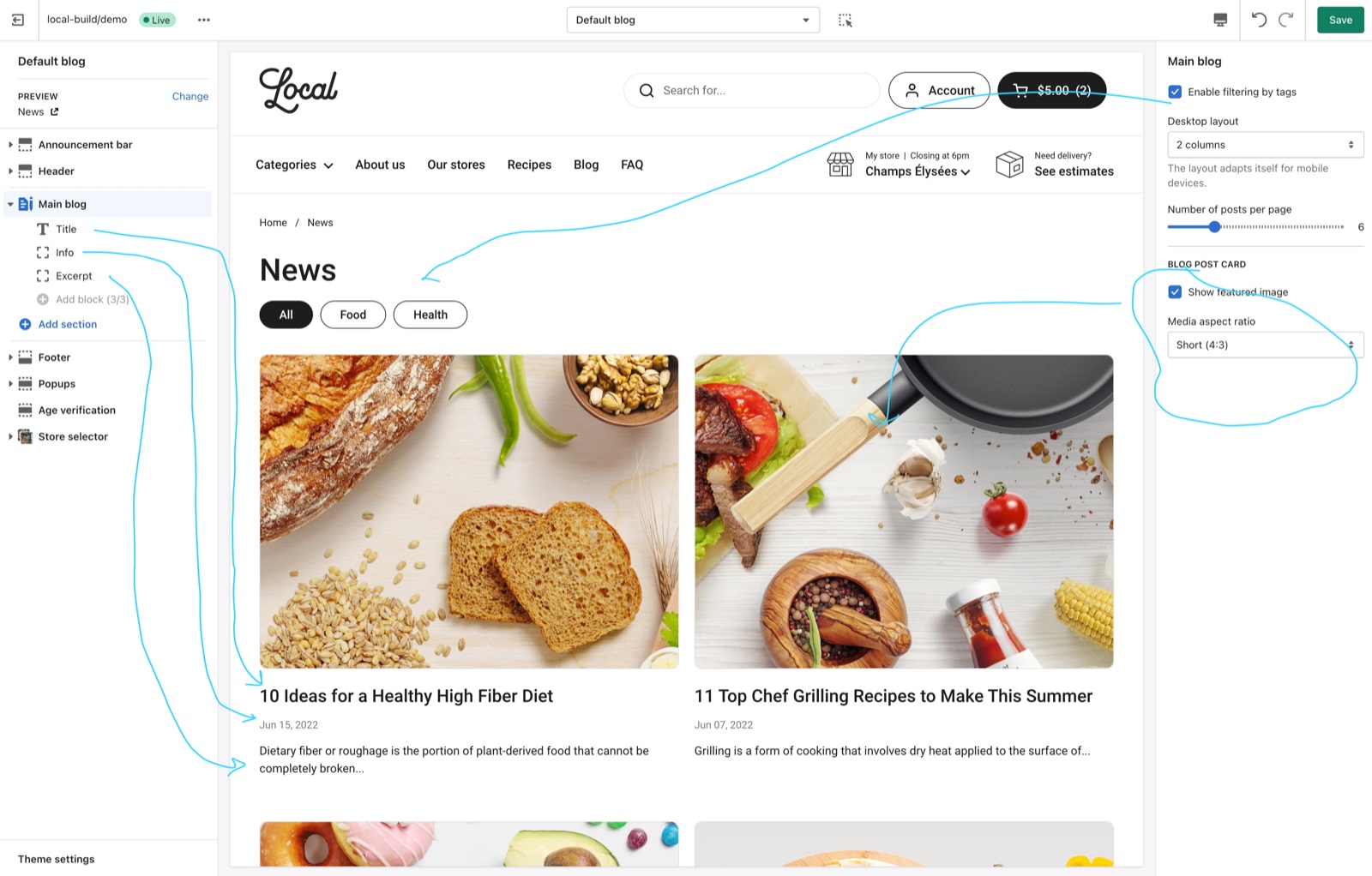
Blog layout
- Enable filtering by tags shows a row of buttons under the blog title: "All" and one button per article tag. A button opens the articles with that tag.
- Desktop layout shows 2 or 3 cards per row on desktop. Mobile shows one card per row.
- Number of posts per page sets 4 to 12 articles per page (default 6). More articles go to the next pages.
Blog post card
- Show featured image shows each article's featured image.
- Media aspect ratio crops the images to Short (4:3, the default), Square (1:1), Tall (5:6) or Taller (2:3).
Blog post card blocks
Each card shows the blocks in the order you set:
- Title: the article title, linked to the article.
- Info: Show date (on by default), Show author and Show comments number.
- Excerpt: the article's excerpt in full, or the start of its content when it has no excerpt. Number of words sets that length (default 15).
The Blog posts section uses the same blocks; see Blog posts section.
How do I filter articles by topic?
Add tags to your articles in Shopify admin → Content → Blog posts, then turn on Enable filtering by tags in Blogs → Default blog → Main blog. The blog page shows one button per tag. Customers select a tag to see only those articles, or "All" to see every article.
Can each blog have its own layout?
Yes. Create a blog template in the theme editor (template picker → Blogs → Create template), change its settings, then assign it to a blog in Shopify admin → Content → Blog posts → Manage blogs → the blog → Theme template. An events blog uses this to show its events by date; see Events calendar.
All Blog page settings
Every setting of the section and its blocks, with its type and default.
Accepts these blocks: Title, Info and Excerpt.
Enable filtering by tags (checkbox, default: off): Shows an All button and one button per article tag under the blog title, so customers can filter the articles by tag.
Desktop layout (dropdown, default: 2 columns): The layout adapts itself for mobile devices. Options: 2 columns, 3 columns.
Number of posts per page (slider 4 to 12, default: 6): The number of articles per page. More articles go to the next pages.
Main blog section: Blog post card
Where to find it: Blogs → Default blog → Main blog → Blog post card
Show featured image (checkbox, default: on).
Media aspect ratio (dropdown, default: Short (4:3)). Options: Short (4:3), Square (1:1), Tall (5:6), Taller (2:3).
Title block
Where to find it: Blogs → Default blog → Main blog → Add block → Title
One Title block per section.
The Title block has no settings in Local 4.2.1.
Info block
Where to find it: Blogs → Default blog → Main blog → Add block → Info
One Info block per section.
Show date (checkbox, default: on).
Show author (checkbox, default: off).
Show comments number (checkbox, default: off): Shows the number of comments, when comments are on for the blog.
Excerpt block
Where to find it: Blogs → Default blog → Main blog → Add block → Excerpt
One Excerpt block per section.
Number of words (slider 5 to 40, default: 15): The number of words shown from the article content when the article has no excerpt. An excerpt always shows in full.
Related pages
- Article page: the page of one article.
- Blog posts section: the latest articles on any page.
- Events calendar: a blog of events, listed by date.