Contact form section
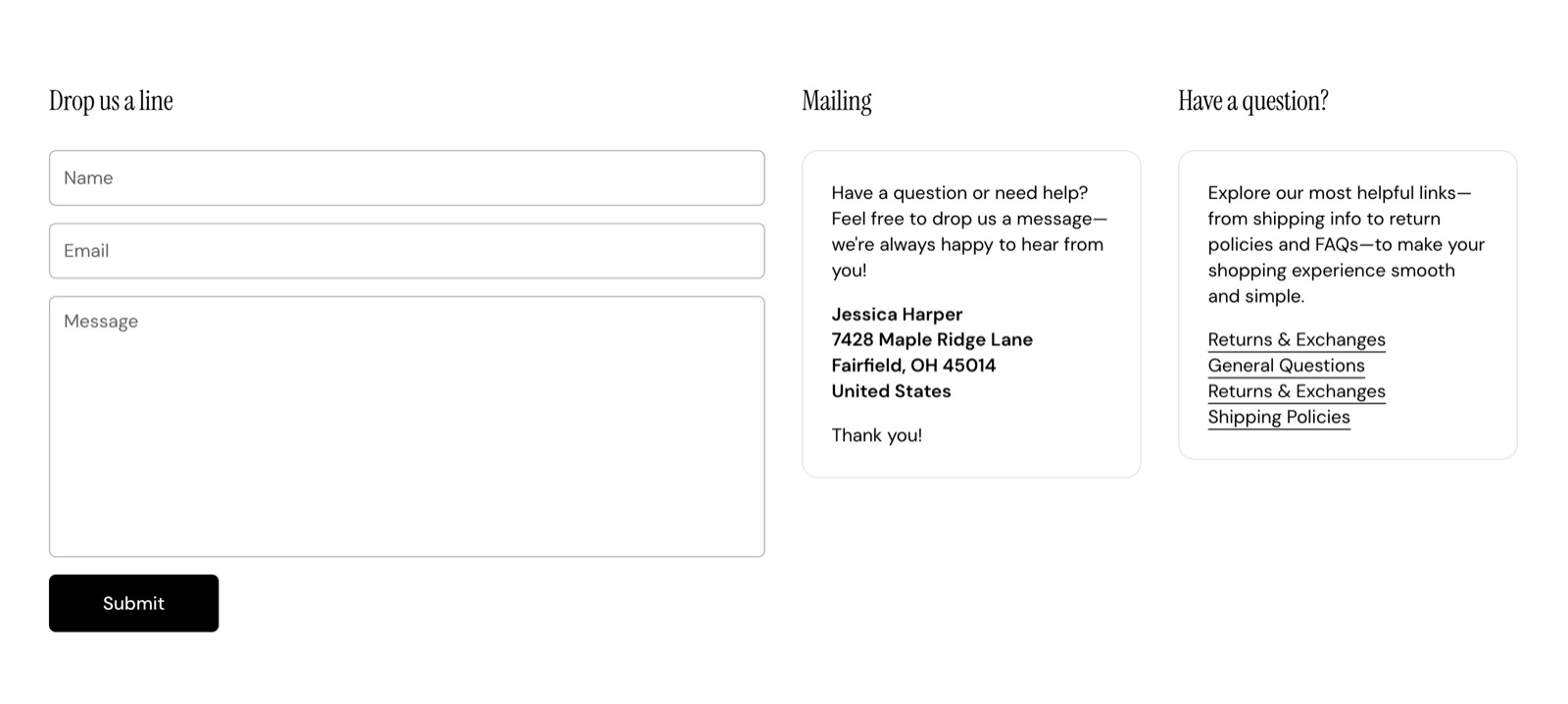
The Contact form section of Combine shows a form with name, email, phone, subject and message fields that sends to your store email.
Applies to: Combine 4.2.0 and later. Added in: Combine 1.0.0. Last checked: 2026-10-13 against Combine 4.2.0.
The Contact form section shows a form that customers use to send you a message, with up to two boxes of contact information next to it. Shopify sends every message to your store's email address.
Where to find it: in the theme editor, select Add section and choose Contact form. The Contact page template (page.contact) already has one; see Alternate page templates.
When a customer sends you an email, you will get it on the email address that is associated with your Shopify account.
Heading
- Heading is the title above the form (default "Drop us a line"). Heading size is Small or Regular.
- Heading tag under SEO sets its HTML level, as described in General section styling.
- Decrease top margin under Gutter makes the space above the section smaller.
Form fields
The form always has Name, Email and Message fields; Email is required. Two more fields are optional:
- Show phone adds a phone number field.
- Show subject adds a subject field.
After sending, the customer sees a thank-you message above the form. The message reaches you as a Shopify contact email, with the fields the customer filled in.
Blocks
The section can hold up to two Contact info blocks, shown next to the form on desktop and under it on screens narrower than 768 px. Select Add block inside the section and choose Contact info.
Contact info
- Title is the box heading, for example "Mailing address" or "Opening hours".
- Content is the box text. It takes bold, italic, links and lists, so you can add an email link or a phone number.
- Background, Text and Border radius under Custom card design give the box its own colors and rounded corners. Leave the colors transparent for plain text.
- Heading tag under SEO sets the HTML level of the box title (default H3).
Where do contact form messages go?
To the email address of your Shopify store. Shopify sends the messages, not Combine, so the address is the one in your Shopify store details, not a theme setting. Check your spam folder if a message does not arrive.
Can I add more fields to the contact form?
Not with settings. The form has Name, Email, Message and the optional Phone and Subject fields. Other fields, such as a file upload or a dropdown, need a form app or custom code; see Custom work and code changes.
All Contact form settings
Every setting of this section, with its type and default.
Accepts these blocks: Contact info.
Heading (text field, default: "Drop us a line"): Sets the title above the form.
Heading size (dropdown, default: Small). Options: Small, Regular.
Contact Form section: Form fields
Where to find it: Contact Form → Form fields
Show phone (checkbox, default: off): Adds a phone number field to the form.
Show subject (checkbox, default: off): Adds a subject field to the form.
Contact Form section: Gutter
Where to find it: Contact Form → Gutter
The Contact Form section uses the standard Gutter settings, listed in General section styling. Not available in this section: Remove bottom margin.
Decrease top margin (checkbox, default: off): Makes the space above the section smaller.
Contact Form section: SEO
Where to find it: Contact Form → SEO
The Contact Form section uses the standard SEO settings, listed in General section styling.
Heading tag (dropdown, default: H2): Sets the HTML level of the heading for search engines. Options: H1, H2, H3, H4, span.
Contact info block
Where to find it: Contact Form → Add block → Contact info
Up to 2 Contact info blocks per section.
Title (text field, default: "Contact information"): Sets the heading of the contact info box.
Content (rich text, default: "Write some useful information about your business, contact information or links to various FAQ page…"): Sets the text of the box. Supports bold, italic, links and lists.
Contact info block: Custom card design
Where to find it: Contact Form → Add block → Contact info → Custom card design
Background (color, default: transparent): Sets the box background. Leave it transparent for plain text.
Text (color, default: transparent): Sets the box text color.
Border radius (slider 0 to 30 px, default: 0 px): Rounds the corners of the box when it has a background.
Contact info block: SEO
Where to find it: Contact Form → Add block → Contact info → SEO
Heading tag (dropdown, default: H3): Sets the HTML level of the box title for search engines. Options: H1, H2, H3, H4, span.
Related pages
- Alternate page templates: the Contact page template.
- Content toggles section: questions and answers with a contact form next to them.
- General section styling: the heading tag and margin settings.