Newsletter section
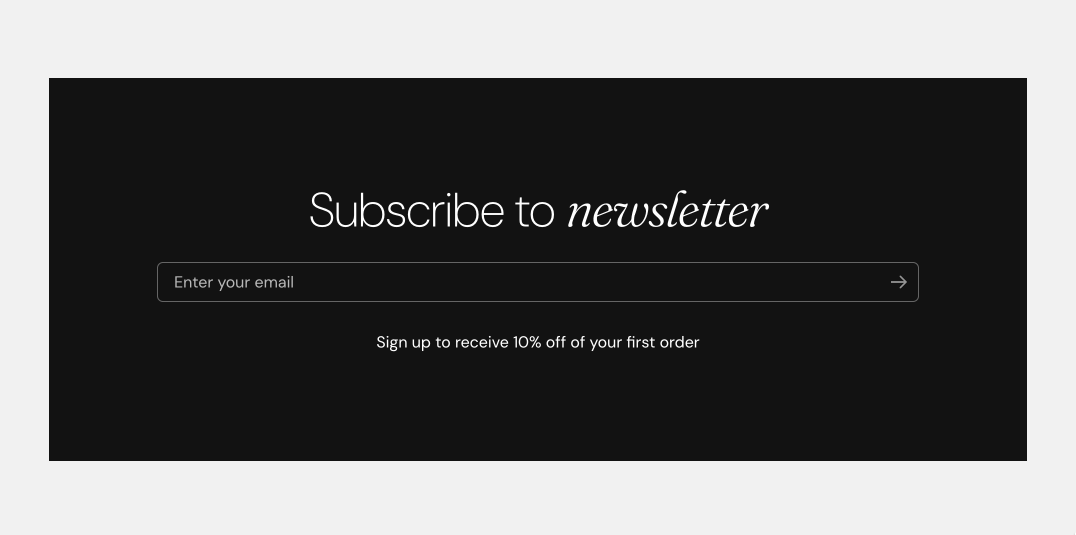
The Newsletter section in Seventh is a Custom grid preset with a card that holds a heading, text and a newsletter signup form.
Applies to: Seventh 4.0.0 and later. Added in: Seventh 1.0.0. Last checked: 2026-10-12 against Seventh 4.0.0.
The Newsletter section shows an email signup form with a heading and a short text, on any page of the store. It is a preset of the Custom grid section, with one card that holds the form.
Where to find it: select Add section in the theme editor, then choose Newsletter in the Forms category.
What it shows
- A section header.
- One card that fills the full row (Cards size XLarge), with the signup form inside.
The Newsletter section has no settings of its own. After you add it, it is a Custom grid section:
- Layout settings: Custom grid section.
- Section design: General section styling.
Blocks
The card is a Card block with these blocks, in this order:
- A Heading block ("Subscribe to newsletter").
- A Newsletter form block: an email field and a submit button.
- A Text block ("Sign up to receive 10% off of your first order").
Change the texts in the Heading and Text blocks. The offer in the Text block is only text: Seventh does not create a discount code for new subscribers.
- The card settings (alignment, padding, color scheme, background media) are on Blank card.
- The form itself has no settings. See Newsletter form block.
Tip: Read more about general card styling here: Seventh card general styles.
Where do newsletter subscribers go?
Subscribers are saved by Shopify, not by Seventh. Each email entered in the form is added to Shopify admin → Customers, with email marketing accepted and the tag newsletter. Send your newsletters from Shopify Email or from an email marketing app that reads Shopify customers. To connect Mailchimp, see MailChimp integration.
Can I send subscribers straight to Mailchimp or Klaviyo?
Not with the Newsletter form block. Seventh does not support sending the form to an email marketing service directly. Install the service's Shopify app, which syncs the Shopify customers who accepted email marketing, or add the app's own signup block to the page instead of the Newsletter section.
Related pages
- Custom grid section: the section that holds the settings of this preset.
- Newsletter form block: the signup form.
- Blank card: the card around the form.
- Footer group: add the Newsletter form block to the footer.
Multicolumn
The Multicolumn section in Seventh places columns or cards side by side, from 1 to 8 columns, for text columns, FAQs, logos, tables and forms.
Product comparison
The Product comparison section in Seventh shows a table that compares the products you choose, row by row: price, rating, metafields and more.