Typography theme settings
The Typography theme settings choose the heading and body fonts of Local, their base sizes, line heights, letter spacing and font weights.
Applies to: Local 4.2.1 and later. Added in: Local 1.0.0. Last checked: 2026-10-13 against Local 4.2.1.
Local uses two font families: one for most headings and one for the body text, which is everything else. You pick both from the fonts included in Shopify, then set their sizes and spacing so the font looks right in your store.
Where to find it: Theme settings → Typography
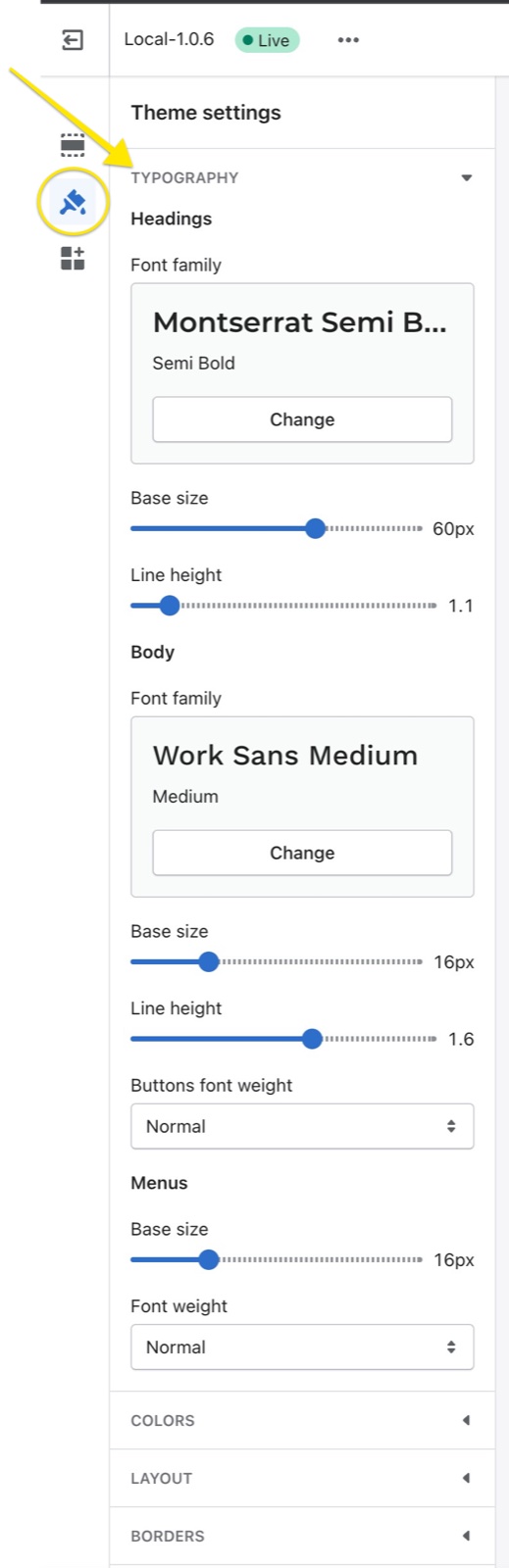
Headings
- Font family sets the font of section headings, page titles and product titles. The weight you choose in the font picker is the heading weight.
- Base size sets the size every heading level is calculated from, from 24 to 80 px. With a base size of 60 px, the largest heading is 58 px on desktop.
- Line height sets the space between the lines of a heading, from 1 to 2 times the font size.
- Letter spacing tightens (negative values) or widens (positive values) the space between letters, from -10 to 20. Each step is 1 percent of the font size.
Body
- Font family sets the font of paragraphs, buttons, menus, prices, forms and all other text.
- Base size sets the size of regular text, from 12 to 28 px. Smaller and larger text, such as captions and product prices, scales from it.
- Line height and Letter spacing work like the heading settings, for body text.
- Buttons font weight shows button labels in the body weight (Normal) or in a bolder weight (Bolder). Bolder is the next weight of the body font, or 700 when the font has no heavier weight.
Menus
- Base size sets the size of the main menu links in the header, from 12 to 28 px.
- Font weight shows the menu links in the normal or a bolder weight of the body font.
Responsive font sizes
Local uses responsive typography: font sizes change with the screen size, but they always come from the base sizes you set here. On screens narrower than 1024 px, headings are smaller (the largest heading is about 60 percent of its desktop size). Change the base size to make all headings or all body text larger or smaller at once.
Can I use my own font?
Not with theme settings. Font family offers the fonts of the Shopify font library only, and Local has no setting to upload your own font files. A custom font, from your own files or from Google Fonts, needs changes to the theme code. See Custom fonts for developers.
Why does my heading font look bolder than I chose?
Because the weight comes from the font style you pick in Font family (for example "Medium" or "Semi Bold"). Choose a lighter style of the same font in the font picker. The Bolder options in this group change only buttons and menus, not headings.
All Typography settings
Every setting, with its type and default.
Typography theme settings: Headings
Where to find it: Theme settings → Typography → Headings
Font family (font, default: Dm Sans (weight 500)): Sets the font of section headings, page titles and product titles. The weight chosen in the font picker is the heading weight.
Base size (slider 24 to 80 px, default: 70 px): Sets the base size every heading level is calculated from. Headings are smaller on screens narrower than 1024 px.
Line height (slider 1 to 2, step 0.1, default: 1.2): Sets the space between the lines of a heading, as a multiple of the font size.
Letter spacing (slider -10 to 20, default: 0): Tightens (negative values) or widens (positive values) the space between heading letters. Each step is 1 percent of the font size.
Typography theme settings: Body
Where to find it: Theme settings → Typography → Body
Font family (font, default: Dm Sans (weight 400)): Sets the font of all text that is not a heading: paragraphs, buttons, menus, prices and forms.
Base size (slider 12 to 28 px, default: 17 px): Sets the size of regular text. Smaller and larger text, such as captions and prices, scales from it.
Line height (slider 1 to 2, step 0.1, default: 1.5): Sets the space between the lines of body text, as a multiple of the font size.
Letter spacing (slider -10 to 20, default: 0): Tightens (negative values) or widens (positive values) the space between body text letters. Each step is 1 percent of the font size.
Buttons font weight (dropdown, default: Bolder): Sets the weight of button labels: Normal uses the body font weight, Bolder the next heavier weight of the body font (700 when the font has none). Options: Normal, Bolder.
Typography theme settings: Menus
Where to find it: Theme settings → Typography → Menus
Base size (slider 12 to 28 px, default: 16 px): Sets the size of the main menu links in the header.
Font weight (dropdown, default: Bolder): Sets the weight of the main menu links: Normal uses the body font weight, Bolder the next heavier weight of the body font. Options: Normal, Bolder.
Related pages
- Custom fonts: add a font that is not in the Shopify font library (developers).
- Colors theme settings: text and accent colors.
- Local presets: the fonts each preset uses.
Layout theme settings
The Layout theme settings set the maximum page width of Local, the vertical space between sections and the horizontal space of grids.
Colors theme settings
The Colors theme settings set the header, body, card, button and footer colors of Local, and how section and card colors override them.