Search drawer section
The Search drawer section shows predictive search results, featured links and a product list when a customer opens search in Seventh.
Applies to: Seventh 4.0.0 and later. Added in: Seventh 1.0.0. Last checked: 2026-10-12 against Seventh 4.0.0.
The Search drawer section is the search panel that slides in when a customer selects the search icon in the header. It shows a search field, live results while the customer types, and optional popular searches and a product list.
Where to find it: in the theme editor sidebar, open the Drawers group and select Search drawer.
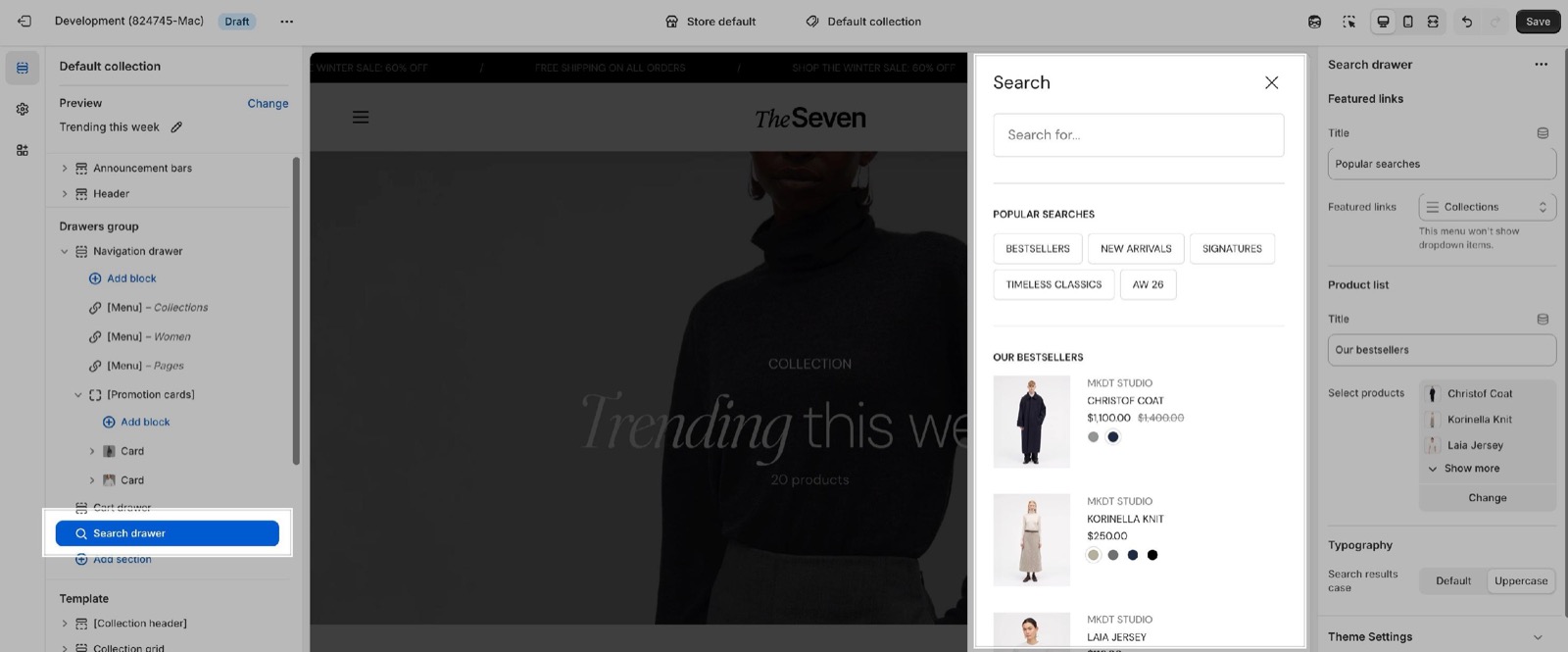
Before the customer types
The popular searches and the product list show below the search field, before the customer types a search. The section has no blocks.
- Featured links shows the top-level links of a menu as quick links, under its Title ("Popular searches" by default).
- Select products shows a list of products, under its Title ("Our bestsellers" by default).
- Each part shows only when it has content. Leave both empty for a drawer with only the search field.
- Search results case shows the drawer text as typed or in capitals.
The design / content options of the products in the search drawer is configured inside the theme's settings.
How do I change which results the search shows first?
Use Shopify's free Search & Discovery app: search results and their order are controlled by Shopify, not by Seventh. The app adds synonyms, boosts products and sets up filters.
You can configure how the (predictive) search is working, by using the Search & Discovery app from Shopify.
Why does the search icon open the search page instead of the drawer?
Shopify's predictive search is not available on the store. Seventh opens the search drawer only when Shopify offers predictive search for the store, which depends on the store's language. Otherwise the search icon goes to the search page. See Shopify's help page Predictive search.
All Search drawer settings
Every setting in this group, with its type and default.
Search drawer section: Featured links
Where to find it: Drawers group → Search drawer → Featured links
Title (text field, default: "Popular searches"): Sets the heading above the featured links, shown before the customer types a search.
Featured links (menu picker): Sets the menu shown as quick links before the customer types a search. Only its top-level links show.
Search drawer section: Product list
Where to find it: Drawers group → Search drawer → Product list
Title (text field, default: "Our bestsellers"): Sets the heading above the product list, shown before the customer types a search.
Select products (products picker): Sets the products shown before the customer types a search. They use the mini product block style.
Search drawer section: Typography
Where to find it: Drawers group → Search drawer → Typography
Search results case (dropdown, default: Uppercase): Sets whether the text in the search drawer shows as typed (Default) or in capitals (Uppercase). Options: Default, Uppercase.
Related pages
- Drawers group: the three drawers and what they share.
- Mini product block theme settings: how products in the search drawer look.
- Predictive search theme settings: search by SKU, barcode and tag.
- Search page: the full search results page.
- Header section: Show search in the main row icons.
Navigation drawer
The Navigation drawer section is the Seventh mobile and side menu. This page lists its settings, its Menu blocks and the promotion cards it can show.
Cart drawer
The Cart drawer section sets the buttons, product recommendations and upsells inside the Seventh cart drawer. It applies when the cart type is Drawer.