Update your theme with Theme Updater Plus
Theme Updater Plus updates a Krown theme and carries over settings and code edits. Check the supported theme versions before you start.
Applies to: All Krown themes. Last checked: 2026-10-13.
Theme Updater Plus is an app by Out of the Sandbox that updates your theme and tries to carry over your code edits too, not only your settings. It supports Local, Combine, Borders, Split, Highlight and Kingdom. Seventh is not supported yet.
Where to find it: Shopify admin → Apps → Theme Updater & Backups, once the app is installed
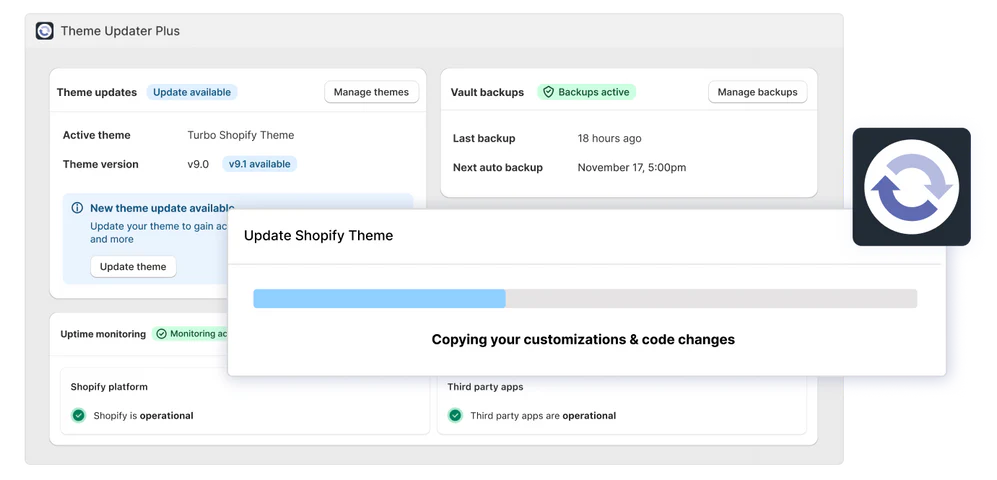
What Theme Updater Plus does
- One-click updates: updates your theme to the latest version and carries over colors, fonts, sections and code edits.
- A list of what it could not transfer: code edits it cannot copy are shown to you, so you can add them by hand.
- Update emails: the app emails you when a new version of your theme is available.
- Vault Backups: automatic backups of your themes and store data, with instant restore. On the App Store this is a separate plan of the same app.
The app is listed on the Shopify App Store as Theme Updater & Backups by Out of the Sandbox. Plans and trials change; check them on the app's page.
Supported theme versions
Seventh: not supported yet.
Before trying out the app, make sure that your version is on the supported versions list!
The lists are the app vendor's, as published by Krown in 2025-01. Your theme version is shown under the theme name in Online Store → Themes.
Kingdom
- 4.2.0
- 4.3.0
- 4.3.1
- 4.3.2
- 4.3.3
- 4.3.4
- 5.0.0
- 5.0.1
- 5.1.0
- 5.1.2
- 5.1.3
- 5.1.7
- 5.2.0 + (all other versions after this)
Split
- 3.2.0
- 3.2.1
- 3.2.2
- 3.2.3
- 3.2.4
- 4.0.0
- 4.0.3
- 4.0.4
- 4.1.0
- 4.1.1
- 4.1.3
- 4.2.0 + (all other versions after this)
Highlight
- 2.2.0
- 2.2.1
- 2.2.2
- 2.2.3
- 2.2.4
- 3.0.0
- 3.0.1
- 3.1.1 + (all other versions after this)
Local
- 1.0.3
- 1.0.4
- 1.0.5
- 1.0.6
- 1.1.0
- 1.2.1
- 1.3.0
- 1.3.1
- 1.3.2
- 2.0.0
- 2.1.0
- 2.1.2
- 2.2.0
- 2.2.1
- 2.2.3
- 2.2.4
- 2.3.0
- 2.3.1
- 2.3.2
- 2.4.0 + (all other versions after this)
Combine
- 1.0.1
- 1.0.2
- 1.1.0
- 1.1.1
- 1.2.0
- 2.0.0
- 2.0.1
- 2.0.2
- 2.1.0
- 2.1.1
- 2.2.0
- 2.2.1
- 2.2.2
- 2.2.3
- 2.3.0
- 2.3.1
- 2.4.0 + (all other versions after this)
Borders
- 1.0.0
- 1.0.1
- 1.1.0
- 1.1.1
- 1.2.0
- 1.2.1
- 1.3.0 + (all other versions after this)
Update your theme with the app
Check your version
Open Shopify admin → Online Store → Themes and read the version under your theme's name. Check that it is in the list above.
Install the app
Open the app from the Theme Updater Plus link above and install it on your store.
Start the update
In the app, choose your current theme and start the update to the latest version. The app builds the updated copy in your theme library; your live theme does not change.
Add what was not transferred
Read the app's list of code edits it could not copy, and add them to the updated copy by hand.
Check and publish
Preview the updated copy in the theme editor, then publish it in Online Store → Themes.
Does the app keep my code customizations?
It tries to. The app carries over as many code edits as it can and lists the ones it could not transfer, so you can copy them by hand. Shopify's own update keeps your settings and the code edits that do not conflict; the app is useful when many edits do conflict.
Should I back up my theme before updating?
Yes. Shopify does not back up your themes or store data for you. At least duplicate your theme in Online Store → Themes before you update. The app's Vault Backups plan backs up your themes and other store data automatically.
Will the app tell me when an update is available?
Yes. The app emails you whenever a new version of your theme is available.
Related pages
- Update your Shopify theme: the update without an app.
- Edit the theme code: keep a record of your code edits.
- Update Seventh: how to update Seventh, which the app does not support yet.